

Introduction
Python Programming Language is one of the simple and widely used popular programming language for developing web applications, games and artificial intelligence created by Guido van Rossum in 1991. Because if its simple syntax, Python programming language has been a popular choice for programmers. Even beginners can learn easily and understand as compared to other programming languages. languages.
It is widely used in data science, artificial intelligence and machine learning. It comes with a rich set of libraries and frameworks for handling data and building models. Libraries is a group of code that you can use in other programs to make programming tasks easier. Some of the widely known libraries are: NumPy, Pandas, SciPy, etc.
The features of Python Programming Languages are:
- It is an interpreted language. i.e code is executed line by line
- It uses indentation to define scope such as loops, functions and classes.
- Keywords are usually written in lowercase letters.
- It is case-sensitive. The identifier ThisData and thisdata are different.
- It supports object oriented features like classes, objects, inheritance and polymorphism and procedural programming approaches.
Advantages of Python Programming Language
- Python consists of simple and readable syntax and hence is easier for a beginner to learn.
- It comes with extensive libraries that can be integrated in a program.
- It can be used for web development, data science, machine learning and more.
- It supports both object oriented and procedural programming approaches.
- It is dynamically typed, so programmers don’t need to explicitly declare variable type.
- It is a platform-independent and can run on Windows, MacOs, Linux and other operating systems without little or no modifications.
Limitations of Python Programming Language
- It is slower as compared to compiled languages because python is an interpreted language.
- Python being a dynamic typed language can lead to runtime errors when data types are incorrectly handled.
- The dynamic feature in Python leads to higher memory consumption compared to other languages.
- Python is not suitable for mobile application development.
Setting Up Python
The first thing is to do installing Python. Go to the Python website: https://www.python.org/downloads/
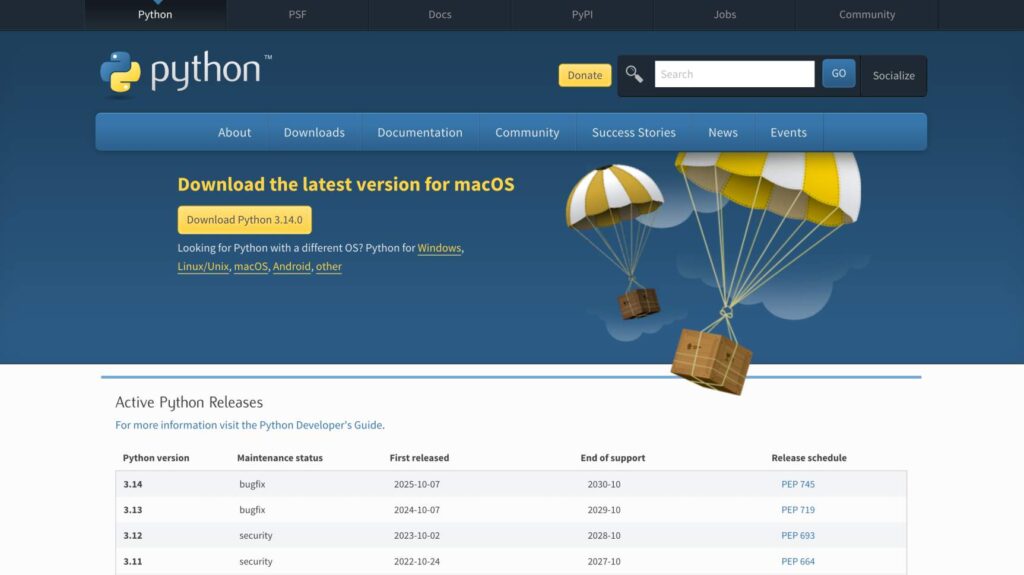
It automatically identifies what version you have and advertise the correct one. Click that Download button and Python is downloaded into your device.
The next step is to install Python. Run the Python Installer to install the Python.
IDE For Python
IDE stands for Integrated Development Environment. It is a software application for writing, compiling and debugging code. It makes the coding process easier with various features such as an error-checking mechanism, debugging features, color coded keywords, built in functions and identifiers.
Python comes with a built in program called IDLE (Integrated Development and Learning Environment) by which you can enter and run Python code. But, you can optional for other IDEs such as PyCharm, Visual Studio Code(VS Code) and Jupyter Notebook.
Comments in Python
Comments are descriptions of the program codes that begin with the # symbol. The interpreters ignore these comments and are only used for program documentation. You can write comments anywhere in a program.
Python comments are of two types:
- Single line comment: # symbol is used as a single line comment. Example: # this is a single line comment.
- Multi line comment: Python doesn’t provide specific syntax for multi-line comments like other programming languages. However, it can be achieved by using triple quotes (“””). Example: “””This is a multiline comment”””
Keywords and Identifiers in Python
Keywords
Keywords are also known as reserved words in Python, as they have specific meanings and purposes. They are predefined and cannot be used as a variable names, function names, or any other identifiers. There are altogether 35 keywords.
The list of Python keywords:
| True | False | none | break | except |
| raise | class | finally | is | return |
| for | try | not | if | elif |
| or | yield | with | global | assert |
| def | from | lambda | nonlocal | as |
| in | and | continue | async | del |
| while | await | import | pass | else |
All the keywords are in lowercase except True and False.
The keywords given above may change based on the Python versions. The new keywords might be added or some existing keywords might be removed.
You may obtain the list of keywords by running the Python code given below:
| import keyword print(keyword.kwlist) |
Identifiers
In Python, identifiers are the variable names, functions, classes, etc. in a program. They are made up of characters, digits and underscores. They are not defined in the programming language but by the programmer according to the requirement.
The rules for naming identifiers are as follows:
- Python keywords cannot be used as identifier names.
- It should not contain a white space.
- Both uppercase and lowercase characters cannot by used.
- It can contain only alphabets, digits and underscore.
- It should start with an alphabet or an underscore not the numbers
- Special characters can’t be used except underscore.